
Beginner's Guide
The following content is very messy, please understand, but everything that can be said has been said, and it is quite comprehensive
Most common extraction issues:
1, Can't find the extraction code
Please open the folder you saved, then find a file named "Extraction code" with the rtf extension
Each extraction package should be placed together with the corresponding rtf file, otherwise errors will occur
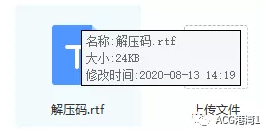
2, Can't open the rtf file
Android users please download WPS software to open
PC users please download Word or OfficeSuite type software
3, Extraction code is wrong
After opening the rtf file in the same location, the extraction code is still wrong
Then it's my mistake, or you have typed it wrong
Android users please download Zarchiver to extract the package
PC users can use any software, such as 7-ZIP, which is ad-free to extract
4, The extraction code error appears halfway through the extraction
This is due to unstable network when you downloaded the file, leading to a corrupted package
What you need to do is, re-new open the link and re-save the download
5, Downloaded, but can't find the file?
Open Baidu Netdisk, find the transfer list, then find this list
The list shows the path of the downloaded files, find these folders one by one
For example, the figure below ↓

6, Downloaded Zarchiver but still get extraction code error
You may have downloaded a pirated version of ZA
Solution: Please download the official version of ZA, the fake version of ZA has a white background
The official version is black, something like this ↓ image from the internet
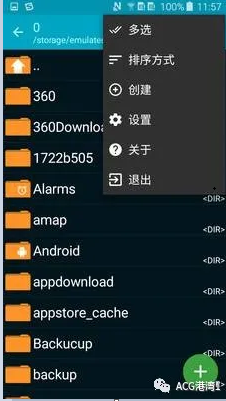
7, File name xxx.7z delete solution
.7z delete is used to prevent others from downloading due to network fluctuations causing corruption
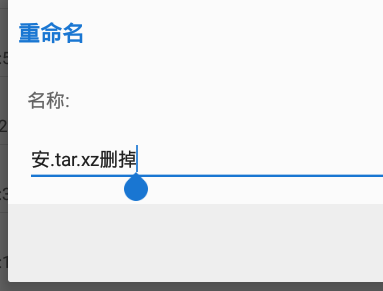
Solution: Open ZA extraction software, find that file, long press the file, find duplicate names,
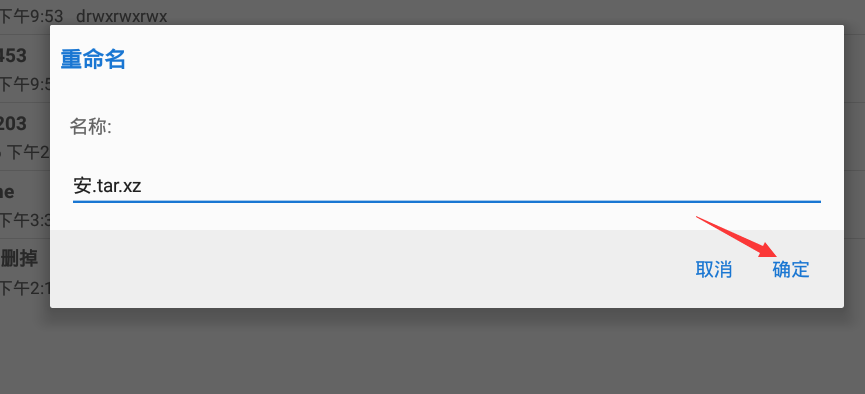
Modify the name, delete the "delete" in [filename.7z delete]
tar.xz delete is the same, delete the "delete" in [filename.tar.xz delete]
Due to emulator reasons, I cannot install ZA software for demonstration
Extraction software please scroll down to the bottom of the article, I have put the links
Step 1 find the file
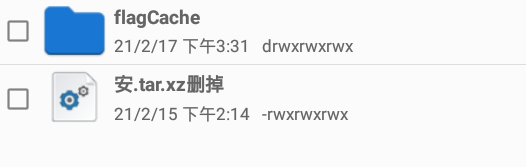
Step 2 find duplicate names
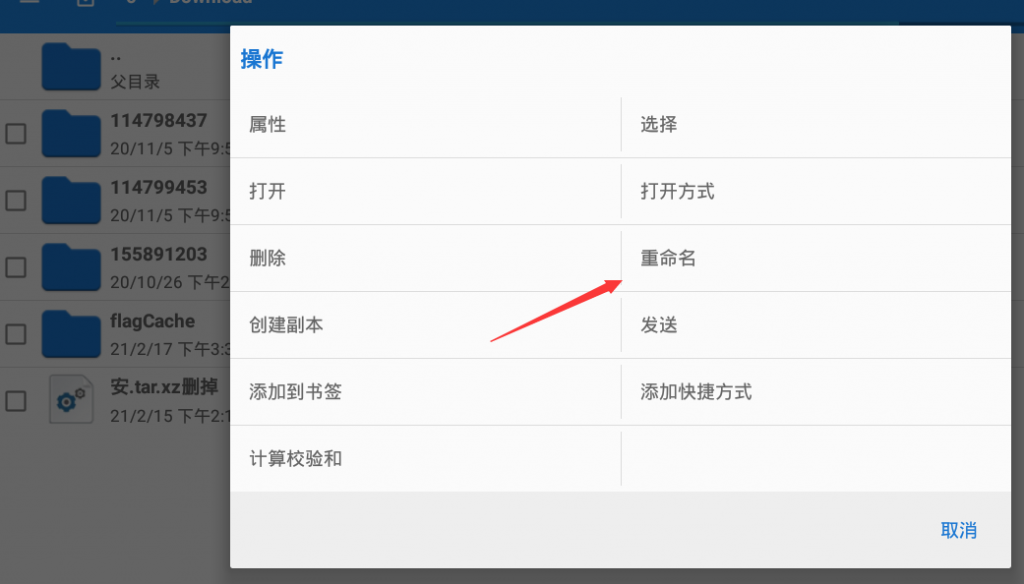
Step 3 delete the delete
Step 4 After completing the duplicate name, click OK, then you can extract
Separator line
Other solutions
1, When opening the game, green bars appear, and the text displays alien characters
Green bar preview
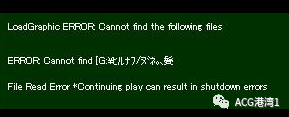
Alien character preview

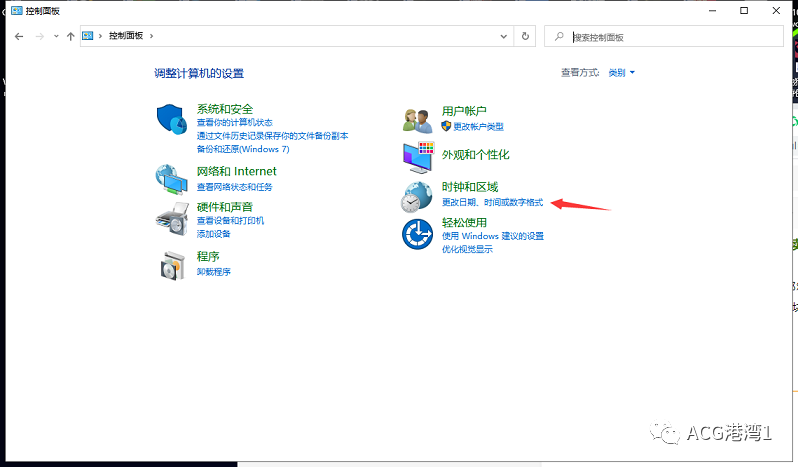
This indicates that you need to switch regions, the method to switch regions is shown below, restart your computer after two steps
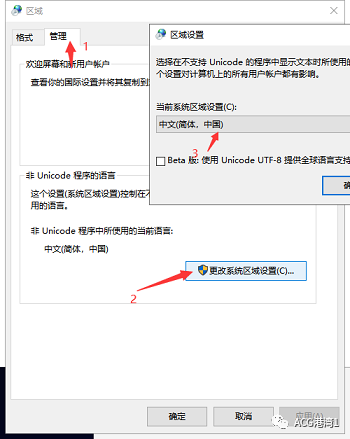
Another situation is that you need an all-English path
If your folder is: D: baidu/1/文件/游戏文件/xxxx/URE ONYX – February
You will find that a folder named 文件 is Chinese, and the next folder is also Chinese. At this time, you need to move the URE ONYX – February folder to D: baidu/1/
above,
or change D: baidu/1/文件/游戏文件/xxxx/to D: baidu/1/wén jiàn/xxxx/URE ONYX – February
2, Android, game can't open
Please look at my article, if it says Android + PC
then Android users can use it, read carefully, some require the Gilerigiri emulator to run
Apple users can also use
Because of time constraints, Apple hasn't been tested, those with patience can try
The usage methods are similar, not much difference
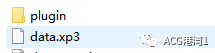
If it's a .apk file later, you don't need Gilerigiri. If it's a set of files, you need to use Gilerigiri to open a file called data.xp3 as shown below
A small part uses another start method, without a preview image, so it's hard to say
3, PC, game can't open
Some games made with Unity indicate 64, 32, etc.
What does this mean?
It means whether your computer system is 32-bit or 64-bit
A 32-bit system can't open a 64-bit launch program, of course, it's a small part that can't be opened
Most can be opened
Separator line
Tip: Android only needs to distinguish between .APK files and non .APK files
.APK means direct installation, just install directly, no other operations needed
1, RPG game essential software RPG Three Treasures
Android users don't need to worry about it, because .APK direct installation doesn't need this
If PC players don't install the three treasures to play RPG games, it will show the picture below
Solution: At this time, you need to download the three treasures and install them on your computer, you need to install all of them
As most of Baidu's links have become invalid, to facilitate everyone, I have already put the software below

2, RPG game error, missing files
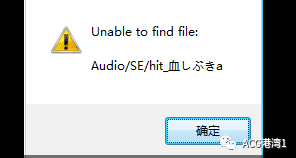
If the picture below appears, it means you are missing files
Add what you are missing, normally there are no missing files, maybe your antivirus or firewall deleted them during extraction
Solution: Find that folder, copy a file with the same name, and rename it to the file you are missing, which can fix it
3, Can't run FLASH games
Sometimes I release some FLASH games, which is the engine logo shown in the figure below
Some of these engines can also be run by mobile users, of course, not all can be run

Solution: Normally, Thunder includes some players, if you have Thunder, just open it with Thunder
If Android users want to run it manually, the software is already placed below
Separator line
The following questions you may need to first know which RPG game engine it is
RPG Maker VX Ace
RPG Maker VX [this image could not be found...]
RPG Maker MV
RPG Maker XP
WOLF RPG
Android phones playing RPG games without direct .APK installation
Some games can only be played on computers, but without a computer, how to play?
Solution: Install Neko RPG software, the tutorial is shown in the figure below
The image is from the internet, seeing a post on Tieba, I don't need to take screenshots one by one
Step 1, find the downloaded file [game]
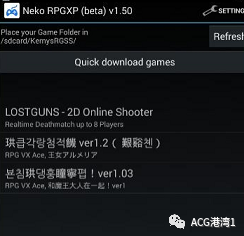
Step 2, click yes
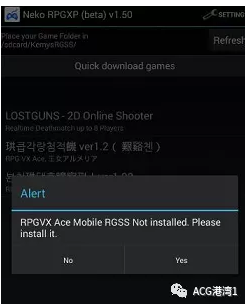
After loading, it's done
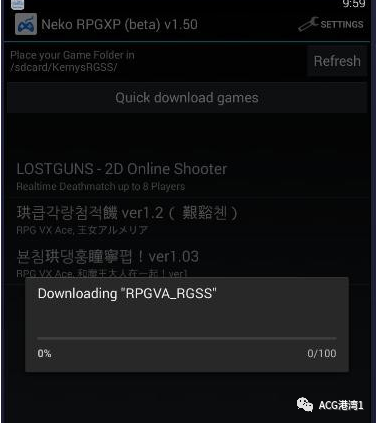
Note: RPGVX and RPGVA are required, these two files and software are already placed below
To make it easier for everyone, I have placed the ZA 0.9.2 version software
If the extraction code is wrong
Normally everything is fine
If there are other issues, you can contact me, if there are problems, you can also contact me
Of course, if it's a stupid question, I will charge 5~10 yuan, after all, who wants to have more trouble
RPG Three Treasures
Link: https://pan.bai删掉du.com/s/1VW4uq删掉13JC0p8MHDp2k5aNQ
Extract code: g2sf
Extraction code: Sanjiro
Neko RPG
Link: https://pan.bai删掉du.com/s/1q1s7kLD-删掉Ms3McQDibqqqIA
Extract code: jxxy
Extraction code: Sanjiro
Gilerigiri + swf player
Link: https://pan.baid删掉u.com/s/1xYxhCP删掉oVqqk_4avH95y1og
Extract code: ig9a
Extraction code: Sanjiro
ZA software
Link: https://pan.xunl删掉ei.com/s/VNhlcv83Yn7pwNR4yxlHtw6MA1#
Extract code: v8h9
If the above version still can't be extracted, try this older version
0.7 version link: https://pan.ba删掉idu.com/s/1JTHPjq删掉6kJbaG41oij7P0GA
Extract code: o945
https://mega.nz/file/yNpTRQRD#26C_a6Qyz5Ob-hQoq42pSb9pUopZhNCChM-Wyi9nL-g
Comments (0)
No comments yet. Be the first to share your thoughts.